
Elliptic Stellarator#
In this tutorial, we run a stellarator case with GVEC and visualize the result.
The notebook covers the following topics:
define the 3D boundary shape
a visualization of multiple poloidal planes,
discuss exporting of the 3D data (vtk).
# set number of OMP threads for gvec (needs to be before import of gvec)
import os

os.environ["OMP_NUM_THREADS"] = "2"
from pathlib import Path

import numpy as np
import matplotlib.pyplot as plt

import gvec
Setting up the GVEC run#
Again, we first define the parameters in a dictionary.
The full list of parameters is found here.
params = {"ProjectName": "GVEC_ellipstell"}
Problem setup#
For this example we will specify the boundary of a rotating ellipse. For this we will set:
The description of the boundary surface is given by
\[\begin{align*} X^1(\vartheta,\zeta) &= X^1_{0,0} + X^1_{1,0} \cos(\vartheta)+ X^1_{1,1} \cos(\vartheta-N_{FP}\zeta)\\ X^2(\vartheta,\zeta) &= \phantom{X^1_{0,0} + {}} X^2_{1,0} \sin(\vartheta) + X^2_{1,1} \sin(\vartheta-N_{FP}\zeta) +X^2_{0,1}\sin(-N_{FP}\zeta) \end{align*} \]where we now use three field periods, so \(N_{FP}=3\).
Rather than specifying the initial guess of the axis, we will let GVEC compute it by specifying
init_average_axis=True. This computes the initial guess by averaging the boundary shape.We will again use cylindrical coordinates for the h-map, so \(X^1=R,X^2=Z\) and
which_hmap=1.
# set hmap to cylinder coordindates: X1=R,X2=Z,zeta=-phi
params["which_hmap"] = 1
# Fourier resolution parameters: --------------------------------------------------
params["X1_mn_max"] = [3, 3]  # maximum Fourier mode numbers for X1 [m:poloidal,n:toroidal]
params["X2_mn_max"] = [3, 3]  # maximum Fourier mode numbers for X2
params["LA_mn_max"] = [3, 3]  # maximum Fourier mode numbers for LA
# Fourier modes of boundary shape -------------------------------------------------

# number of field periods
params["nfp"] = 3
# (m,n) cosine Fourier mode coefficient for X1
params["X1_b_cos"] = {
    (0, 0): 3.0,
    (1, 0): 1.0,
    (1, 1): 0.4,
}
# (m,n) sine Fourier mode coefficient for X2
params["X2_b_sin"] = {
    (1, 0): 1.0,
    (1, 1): -0.4,
    (0, 1): -0.25,
}
# initial guess for magnetic axis is computed from the boundary shape
params["init_average_axis"] = True
The remaining parameters (radial discretization, profiles, minimization) will be left unchanged from the elliptic tokamak tutorial
# append remaining parameters, based on previous tokamak case
params |= {
    # profile definitions for iota and pressure ---------------------------------------
    # total toriodal flux (scales magnetic field stength)
    "PhiEdge": 1.0,
    "iota": {
        "type": "polynomial",
        "coefs": [0.625, 0.35],
    },
    "pres": {
        "type": "polynomial",
        "coefs": [1.0, -1.0],
        "scale": 1000.0,
    },
    # radial resolution parameters ----------------------------------------------------
    # number of radial B-spline elements
    "sgrid_nElems": 2,
    # degree of B-splines for X1 and X2
    "X1X2_deg": 5,
    # degree of B-splines for LA
    "LA_deg": 5,
    # Minimizer parameters ------------------------------------------------------------
    # maximum number of iterations
    "totalIter": 10000,
    # abort tolerance on sqrt(|forces|^2) in the energy minimization
    "minimize_tol": 1e-6,
    # optional parameters -------------------------------------------------------------
    "logIter": 100,  # log interval for diagnostics
}
# write parameters to file
gvec.util.write_parameters(params, "ellipstell_parameters.toml")
Running GVEC#
We now have all the parameters in a dictionary params, which we can pass to gvec.run
The output is stored in the run object.
runpath = Path("run_ellipstell")
run = gvec.run(params, runpath=runpath)  # overwrites runpath or creates a new one
GVEC: |>|
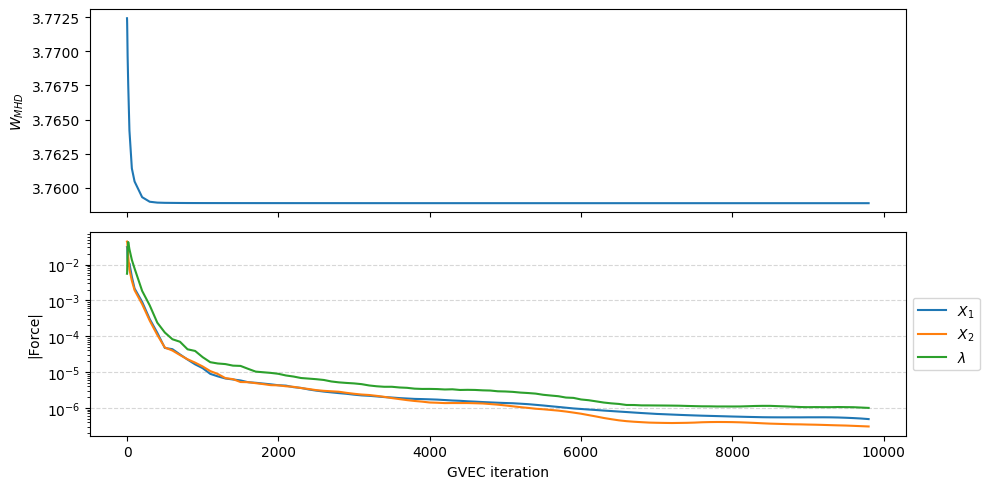
GVEC finished after   5.3 seconds  using 9800 iterations (totalIter = 10000)  with |force| = 1.00e-06 (minimize_tol = 1.00e-06)
As with the tokamak case, we can extract and plot the history of the GVEC run to see the change in total MHD energy and the norm of the forces.
fig = run.plot_diagnostics_minimization()
Post-processing#
Loading the state#
As usual we load a gvec.State so that we can evaluate and visualise the quantities we want.
state = run.state
# alternatively:
# state = gvec.find_state(runpath)
Evaluating equilibrium quantities#
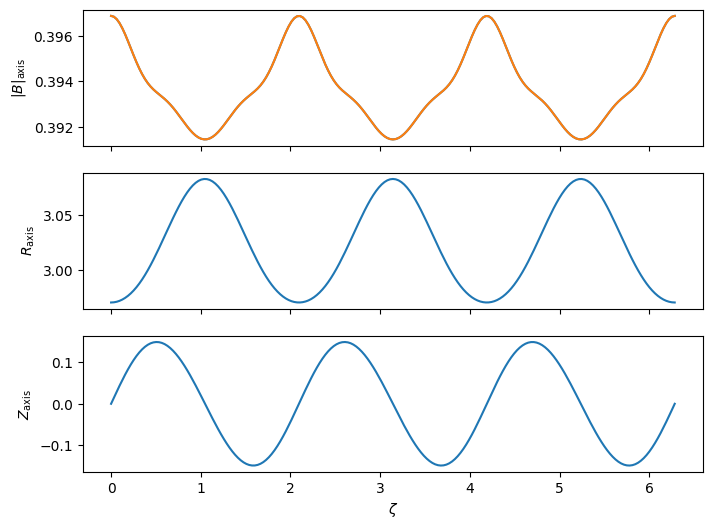
We will now extract two data sets for plotting. The first is the position of the magnetic axis \((\rho=0)\) on the full torus, and \(|B|\) along the axis.
Note derived quantities (such as \(|B|\)) cannot be evaluated exactly on the axis, so here we specify \(\rho=10^{-8}\).
ev_axis = state.evaluate(
    "pos",
    "N_FP",
    "mod_B",
    rho=[1.0e-8],
    theta=[0.0],
    zeta=np.linspace(0, 2 * np.pi, 201),
)

# reduce the xarray dataset 1D
ev_axis_1d = ev_axis.sel(rho=ev_axis.rho[0]).sel(theta=ev_axis.theta[0])
The second dataset is the full 3D volume on a single field period. Note that:
It is possible to evaluate additional quantities that were not included initially in
varlist.Previously evaluated quantities in the
evdataset are kept, and only the additional ones are.
# poloidal visualization points
theta = np.linspace(0, 2 * np.pi, 50)
# toroidal visualization points
zeta = np.linspace(0, 2 * np.pi / state.nfp, 8 * 4 + 1)
varlist = ["pos", "mod_B", "iota", "p", "I_tor", "I_pol"]

ev = state.evaluate(*varlist, rho=20, theta=theta, zeta=zeta)

# compute additional quantities
state.compute(ev, "grad_rho", "grad_theta", "grad_zeta");
WARNING Computation of `I_pol` uses `rho=5.263158e-03` instead of the magnetic axis.
Visualization#
Profiles#
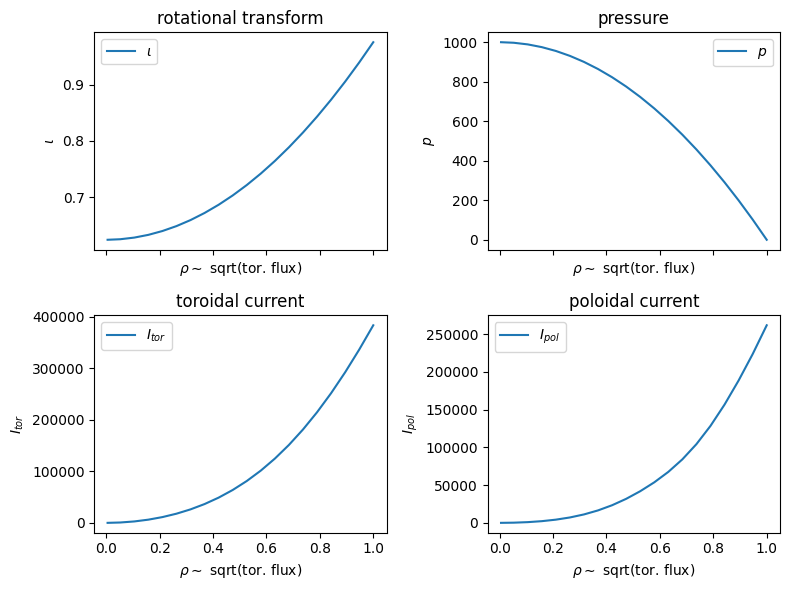
First we plot the relevant profiles, now over the radial coordinate \(\rho\sim \sqrt{\Phi}\).
The rotational transform and pressure are input profiles, and the current profiles are computed from the equilibrium solution.
# === Profiles === #
fig, axs = plt.subplots(2, 2, figsize=(8, 6), tight_layout=True, sharex=True)

for ax, var in zip(axs.flatten(), ["iota", "p", "I_tor", "I_pol"]):
    ax.plot(ev.rho, ev[var], label=f"${ev[var].attrs['symbol']}$")
    ax.set(
        title=f"{ev[var].attrs['long_name']}",
        xlabel="$\\rho\\sim$ sqrt(tor. flux)",
        ylabel=f"${ev[var].attrs['symbol']}$",
    )

for ax in axs.flat:
    ax.legend()
Visualize axis quantities#
Let us now plot the magnetic field strength on axis and the axis position as evaluated above.
fig, axs = plt.subplots(3, 1, figsize=(8, 6), sharex=True)

for ax, var, ylab in zip(
    axs.flatten(),
    ["mod_B", "X1", "X2"],
    [r"$|B|_\text{axis}$", r"$R_\text{axis}$", r"$Z_\text{axis}$"],
):
    ax.plot(ev_axis_1d.zeta, ev_axis_1d[var], label=f"${ev[var].attrs['symbol']}$")
    ax.set(
        ylabel=ylab,
    )
axs[0].plot(ev_axis_1d.zeta, ev_axis_1d.mod_B)
axs[-1].set(xlabel="$\\zeta$");
Plotting poloidal planes#
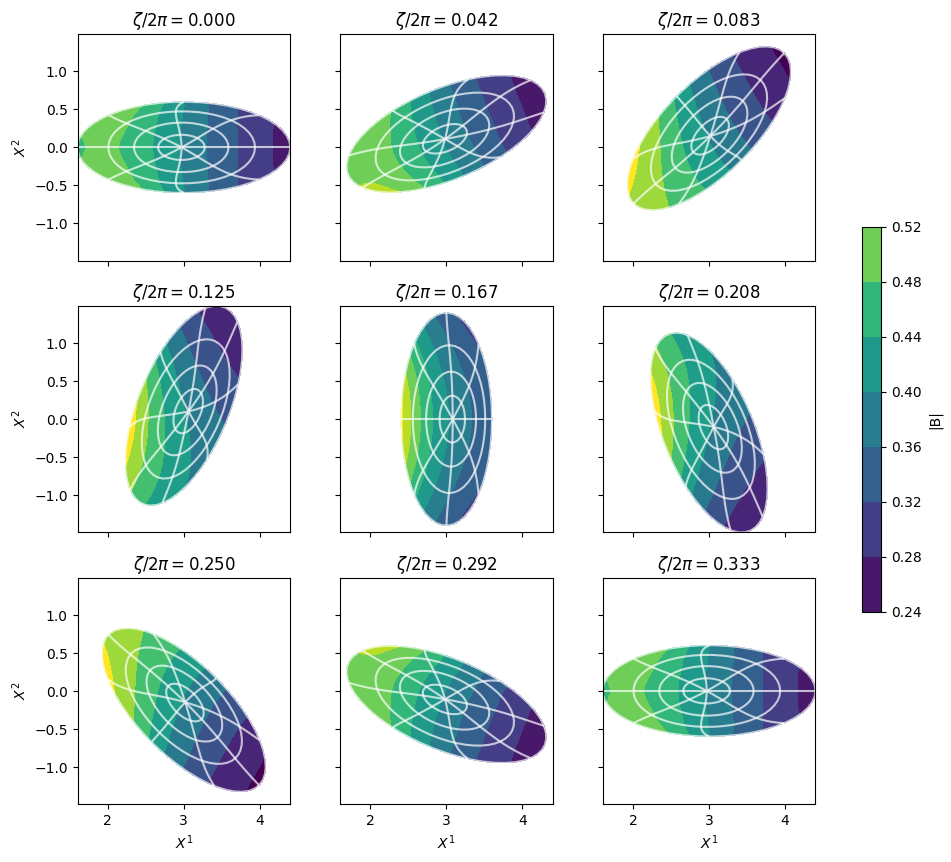
From the 3D volume dataset (the one we evaluated second), we can plot the magnetic field strength \(|B|\) in a series of poloidal planes, where we also show the visualization grid the lines of rho=const and theta=const.
# === Cross-sections === #
fig, axs = plt.subplots(3, 3, figsize=(12, 10), sharex=True, sharey=True)

vmin = np.amin(ev.mod_B)
vmax = np.amax(ev.mod_B)
r_levels = np.linspace(0, 1 - 1e-10, 5)
t_levels = np.linspace(0, 2 * np.pi, 9)
for ax, zeta_pos in zip(axs.flat, ev.zeta[::4]):
    # select zeta-plane from dataset
    ev_z = ev.sel(zeta=zeta_pos, method="nearest")

    c = ax.contourf(ev_z.X1, ev_z.X2, ev_z.mod_B, vmin=vmin, vmax=vmax)

    ax.contour(ev_z.X1, ev_z.X2, 0 * ev_z.X1 + ev_z.rho, r_levels, colors="white", alpha=0.7)
    ax.contour(ev_z.X1, ev_z.X2, 0 * ev_z.X1 + ev_z.theta, t_levels, colors="white", alpha=0.7)

    ax.set(
        aspect="equal",
        title=f"$\\zeta/2\\pi = {zeta_pos / (2 * np.pi):.3f}$",
    )


for ax in axs[-1, :]:
    ax.set_xlabel(f"${ev.X1.attrs['symbol']}$")
for ax in axs[:, 0]:
    ax.set_ylabel(f"${ev.X2.attrs['symbol']}$")

fig.colorbar(c, ax=axs, shrink=0.5, label="|B|");
3D visualization#
In a notebook, there are many ways for 3D interactive visualization, (plotly,pyvista…), but they can be difficult to set up and will not be discussed here.
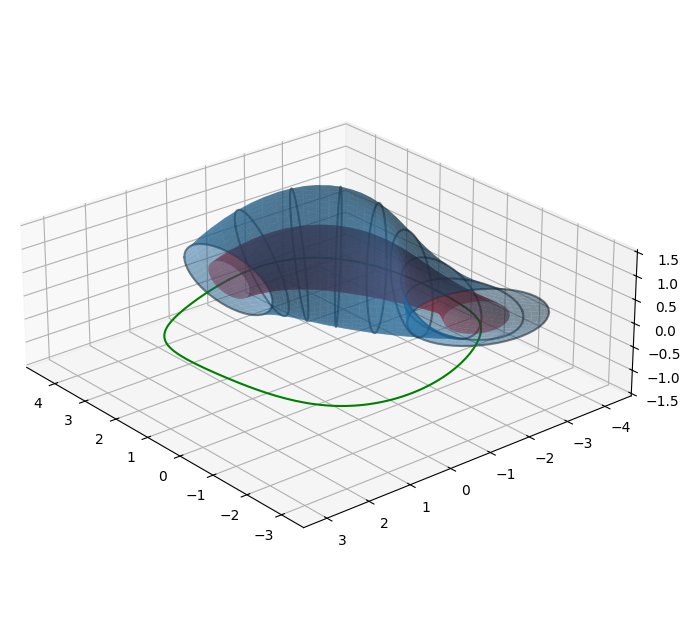
Here, we use matplotlib for a non-interactive example showing two flux surfaces, boundary cuts and plot the magnetic axis.
x, y, z = np.asarray(ev.pos)

fig = plt.figure(figsize=(8, 8))
ax = fig.add_subplot(111, projection="3d", alpha=0.9)
# last surface in rho
ax.plot_surface(x[-1, :, :], y[-1, :, :], z[-1, :, :], alpha=0.5)
# cuts of the boundary
for iz in range(0, ev.sizes["tor"], 4):
    ax.plot3D(x[-1, :, iz], y[-1, :, iz], z[-1, :, iz], alpha=0.5, color="k")
# flux surface mid-radius
x, y, z = np.asarray(ev.pos.sel(rho=0.5, method="nearest"))
ax.plot_surface(x, y, z, alpha=0.5, color="red")

x, y, z = np.asarray(ev_axis.pos)
ax.plot3D(x, y, z, color="green")

ax.set(aspect="equal")
ax.view_init(25, 140, 0)
Exporting data for visualization#
For 3D visualizations one might want to change to powerful 3D visualization tools such as paraview. For such purposes pyGVEC datasets can easily be exported to the .vts format via the ev2vtk function. Note that all variables will be broadcast to the 3D grid defined by the pos variable. Hence, it might be advisable to select just those variables which will be used during the visualization to avoid unnecessary large files.
from gvec.vtk import ev2vtk

variables_for_3D = ["X1", "X2", "LA", "pos", "B"]
visu_data_3D = ev[variables_for_3D]
ev2vtk("pyGVEC_3d_visu", visu_data_3D)
xarray datasets can also be exported as netCDF (or a number of other file formats):
visu_data_3D.to_netcdf("pyGVEC_3d_visu.nc")